Vocal Remover - Musiclab2.5.6
Publisher Description


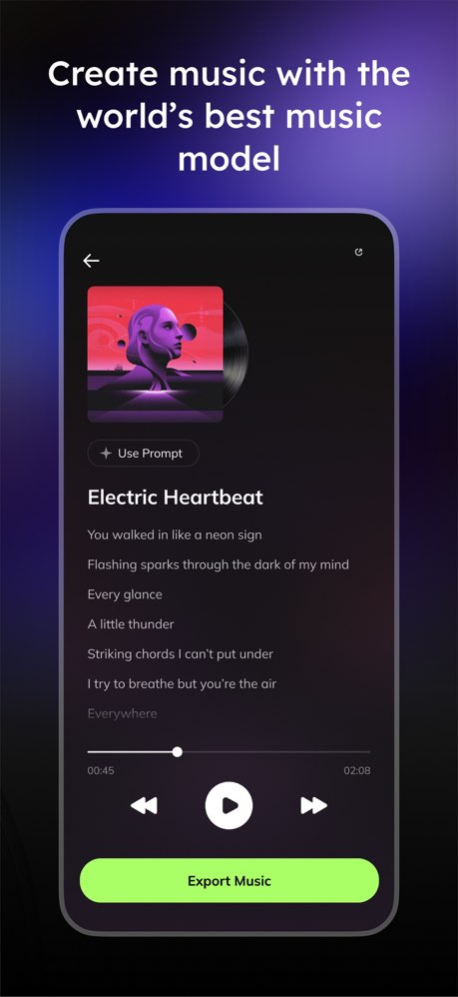
Musiclab is a free AI vocal remover and audio splitter. It allows you to extract vocals, instruments, and accompaniment from songs using cutting-edge AI technology. Musicians can easily reduce noise in audio and split songs into mutiple tracks with Musiclab. In addition to these features, it is also a perfect maker for karaoke, acapella or instrumental backing tracks.
Main Features of The Vocal Remover & AI Audio Splitter:
-AI Audio Separation of stems: Easily separate vocals, acapella, drums, guitar, bass, piano, strings, and other instruments in any songs. Musiclab serves as your vocal remover, acapella extractor or backing track maker.
-Export: Extract and share high-quality audio mixes and separated stems. Perfect for extracting stems for use with other track makers or with our vocal remover.
-Backing Tracks: Create acapella, drum, guitar, karaoke, and piano backing tracks.
-Noise Reducer: Remove background noise and enhance audio quality for a crystal-clear listening experience.
-Bpm Finder and Changer: Automatically detect bpm and allow you to adjust bpm with ease.
-Key Finder and Changer: Identify the key of the audio and assist you in adjusting the pitch effortlessly.
How to Remove Vocals And Instruments from Songs:
The free vocal isolator makes removing vocals a breeze in 4 simple steps:
-Upload any audio/video file, device, or public URL.
-AI separates vocals and instruments into multiple tracks.
-Modify tracks, remove vocals, control volume, and easily mute tracks.
-Download tracks or custom mix.
Supported import methods:
Import from Google Drive, Dropbox, iCloud, or public URL.
Add songs in MP3, WAV, or M4A formats.
**Instrumental Maker and Booster**
Remove unwanted human voices accurately from songs to create instrumental versions. Boost the volume and amplify the sound of any instrument such as drums, bass, piano, and more.
**Music Pitch and Speed Changer**
MusicLab enables you to easily change the pitch and speed of audio adjusting its sliders.
**Karaoke Maker**
Create karaoke songs or extract acapella from audio file by removing vocal.
**Instrument Remover**
Musiclab is more than just a vocal remover; it can also remove drums, bass, piano, and other instruments from songs.
Drum remover: eliminate drums
Bass remover: eliminate bass
Piano remover: eliminate piano
Guitar/harmonics remover
Musiclab is the perfect tool for:
Music lovers, students, and teachers.
Drummers, bassists, guitarists: set the beat and groove.
Singers, acapella groups, pianists, karaoke enthusiasts: use our vocal remover to hit the right pitch and harmony.
Social Media Content Creators: create tunes and follow trends.
Version History Bug fixes and performance improvements 2.5.6 3d ago Bug fixes and performance improvements 2.5.5 5d ago Fixed some known bugs. 2.5.4 Sep 3 Fixed some known bugs. 2.5.3 Aug 17 Fixed some known issues. 2.5.2 May 11 Added prompt word optimization function 2.5.1 Mar 16 - Added music video generation function
- Added WAV download function for generated music. 2.5.0 Mar 15 - Optimized AI music generation function 2.4.4 Jan 23 Fixed some known issues 2.4.3 Jan 6 Fixed some known issues 2.4.2 12/30/2025 Optimized some known issues 2.4.1 12/19/2025 Added a music generation feature 2.4.0 11/18/2025 Added "AI Lyrics Generation" feature, along with a professional lyrics editor. 2.3.0 10/22/2025 Now you can mastering with AI 2.2.0 09/15/2025 bug fix 2.1.1 07/29/2025 Lead-vocal separation and reverb separation 2.1.0 07/15/2025 Added AI cover function 2.0.0 05/06/2025 bug fix 1.9.1 03/27/2025 bug fix 1.9.0 03/20/2025 bug fix 1.8.4 02/26/2025 bug fix 1.8.3 02/25/2025 bug fix 1.8.2 02/12/2025 bug fix 1.8.1 02/11/2025 bug fix 1.8.0 01/14/2025 bug fix 1.7.6 01/07/2025
About Vocal Remover - Musiclab
The company that develops Vocal Remover - Musiclab is CHENGDU Yiwo Tech Development Co., Ltd. The latest version released by its developer is 2.5.6.
To install Vocal Remover - Musiclab on your iOS device, just click the green Continue To App button above to start the installation process. The app is listed on our website since 2026-10-14 and was downloaded 69 times. We have already checked if the download link is safe, however for your own protection we recommend that you scan the downloaded app with your antivirus. Your antivirus may detect the Vocal Remover - Musiclab as malware if the download link is broken.
How to install Vocal Remover - Musiclab on your iOS device:
- Click on the Continue To App button on our website. This will redirect you to the App Store.
- Once the Vocal Remover - Musiclab is shown in the iTunes listing of your iOS device, you can start its download and installation. Tap on the GET button to the right of the app to start downloading it.
- If you are not logged-in the iOS appstore app, you'll be prompted for your your Apple ID and/or password.
- After Vocal Remover - Musiclab is downloaded, you'll see an INSTALL button to the right. Tap on it to start the actual installation of the iOS app.
- Once installation is finished you can tap on the OPEN button to start it. Its icon will also be added to your device home screen.
Program Details
System requirements
Download information
Pricing
Version History
version 2.5.6
posted on 2026-10-14
Version History Bug fixes and performance improvements 2.5.6 3d ago Bug fixes and performance improvements 2.5.5 5d ago Fixed some known bugs. 2.5.4 Sep 3 Fixed some known bugs. 2.5.3 Aug 17 Fixed some known issues. 2.5.2 May 11 Added prompt word optimization function 2.5.1 Mar 16 - Added music video generation function
- Added WAV download function for generated music. 2.5.0 Mar 15 - Optimized AI music generation function 2.4.4 Jan 23 Fixed some known issues 2.4.3 Jan 6 Fixed some known issues 2.4.2 12/30/2025 Optimized some known issues 2.4.1 12/19/2025 Added a music generation feature 2.4.0 11/18/2025 Added "AI Lyrics Generation" feature, along with a professional lyrics editor. 2.3.0 10/22/2025 Now you can mastering with AI 2.2.0 09/15/2025 bug fix 2.1.1 07/29/2025 Lead-vocal separation and reverb separation 2.1.0 07/15/2025 Added AI cover function 2.0.0 05/06/2025 bug fix 1.9.1 03/27/2025 bug fix 1.9.0 03/20/2025 bug fix 1.8.4 02/26/2025 bug fix 1.8.3 02/25/2025 bug fix 1.8.2 02/12/2025 bug fix 1.8.1 02/11/2025 bug fix 1.8.0 01/14/2025 bug fix 1.7.6 01/07/2025
version 2.5.4
posted on 2026-10-07
Version History Fixed some known bugs. 2.5.4 Sep 3 Fixed some known bugs. 2.5.3 Aug 17 Fixed some known issues. 2.5.2 May 11 Added prompt word optimization function 2.5.1 Mar 16 - Added music video generation function
- Added WAV download function for generated music. 2.5.0 Mar 15 - Optimized AI music generation function 2.4.4 Jan 23 Fixed some known issues 2.4.3 Jan 6 Fixed some known issues 2.4.2 12/30/2025 Optimized some known issues 2.4.1 12/19/2025 Added a music generation feature 2.4.0 11/18/2025 Added "AI Lyrics Generation" feature, along with a professional lyrics editor. 2.3.0 10/22/2025 Now you can mastering with AI 2.2.0 09/15/2025 bug fix 2.1.1 07/29/2025 Lead-vocal separation and reverb separation 2.1.0 07/15/2025 Added AI cover function 2.0.0 05/06/2025 bug fix 1.9.1 03/27/2025 bug fix 1.9.0 03/20/2025 bug fix 1.8.4 02/26/2025 bug fix 1.8.3 02/25/2025 bug fix 1.8.2 02/12/2025 bug fix 1.8.1 02/11/2025 bug fix 1.8.0 01/14/2025 bug fix 1.7.6 01/07/2025 Improved UI and UE experience. 1.7.2 11/28/2024 Improved UI and UE experience. 1.7.1 11/20/2024
version 2.5.4
posted on 2026-09-06
Version History Fixed some known bugs. 2.5.4 2d ago Fixed some known bugs. 2.5.3 Aug 17 Fixed some known issues. 2.5.2 May 11 Added prompt word optimization function 2.5.1 Mar 16 - Added music video generation function
- Added WAV download function for generated music. 2.5.0 Mar 15 - Optimized AI music generation function 2.4.4 Jan 23 Fixed some known issues 2.4.3 Jan 6 Fixed some known issues 2.4.2 12/30/2025 Optimized some known issues 2.4.1 12/19/2025 Added a music generation feature 2.4.0 11/18/2025 Added "AI Lyrics Generation" feature, along with a professional lyrics editor. 2.3.0 10/22/2025 Now you can mastering with AI 2.2.0 09/15/2025 bug fix 2.1.1 07/29/2025 Lead-vocal separation and reverb separation 2.1.0 07/15/2025 Added AI cover function 2.0.0 05/06/2025 bug fix 1.9.1 03/27/2025 bug fix 1.9.0 03/20/2025 bug fix 1.8.4 02/26/2025 bug fix 1.8.3 02/25/2025 bug fix 1.8.2 02/12/2025 bug fix 1.8.1 02/11/2025 bug fix 1.8.0 01/14/2025 bug fix 1.7.6 01/07/2025 Improved UI and UE experience. 1.7.2 11/28/2024 Improved UI and UE experience. 1.7.1 11/20/2024
version 2.5.3
posted on 2026-08-30
Version History Fixed some known bugs. 2.5.3 Aug 17 Fixed some known issues. 2.5.2 May 11 Added prompt word optimization function 2.5.1 Mar 16 - Added music video generation function
- Added WAV download function for generated music. 2.5.0 Mar 15 - Optimized AI music generation function 2.4.4 Jan 23 Fixed some known issues 2.4.3 Jan 6 Fixed some known issues 2.4.2 12/30/2025 Optimized some known issues 2.4.1 12/19/2025 Added a music generation feature 2.4.0 11/18/2025 Added "AI Lyrics Generation" feature, along with a professional lyrics editor. 2.3.0 10/22/2025 Now you can mastering with AI 2.2.0 09/15/2025 bug fix 2.1.1 07/29/2025 Lead-vocal separation and reverb separation 2.1.0 07/15/2025 Added AI cover function 2.0.0 05/06/2025 bug fix 1.9.1 03/27/2025 bug fix 1.9.0 03/20/2025 bug fix 1.8.4 02/26/2025 bug fix 1.8.3 02/25/2025 bug fix 1.8.2 02/12/2025 bug fix 1.8.1 02/11/2025 bug fix 1.8.0 01/14/2025 bug fix 1.7.6 01/07/2025 Improved UI and UE experience. 1.7.2 11/28/2024 Improved UI and UE experience. 1.7.1 11/20/2024 Improved UI and UE experience. 1.7.0 11/07/2024
version 2.5.2
posted on 2026-08-11
Version History Fixed some known issues. 2.5.2 May 11 Added prompt word optimization function 2.5.1 Mar 16 - Added music video generation function
- Added WAV download function for generated music. 2.5.0 Mar 15 - Optimized AI music generation function 2.4.4 Jan 23 Fixed some known issues 2.4.3 Jan 6 Fixed some known issues 2.4.2 12/30/2025 Optimized some known issues 2.4.1 12/19/2025 Added a music generation feature 2.4.0 11/18/2025 Added "AI Lyrics Generation" feature, along with a professional lyrics editor. 2.3.0 10/22/2025 Now you can mastering with AI 2.2.0 09/15/2025 bug fix 2.1.1 07/29/2025 Lead-vocal separation and reverb separation 2.1.0 07/15/2025 Added AI cover function 2.0.0 05/06/2025 bug fix 1.9.1 03/27/2025 bug fix 1.9.0 03/20/2025 bug fix 1.8.4 02/26/2025 bug fix 1.8.3 02/25/2025 bug fix 1.8.2 02/12/2025 bug fix 1.8.1 02/11/2025 bug fix 1.8.0 01/14/2025 bug fix 1.7.6 01/07/2025 Improved UI and UE experience. 1.7.2 11/28/2024 Improved UI and UE experience. 1.7.1 11/20/2024 Improved UI and UE experience. 1.7.0 11/07/2024 Improved UI and UE experience. 1.6.3 10/22/2024
version 2.5.2
posted on 2026-05-17
Version History Fixed some known issues. 2.5.2 4d ago Added prompt word optimization function 2.5.1 Mar 16 - Added music video generation function
- Added WAV download function for generated music. 2.5.0 Mar 15 - Optimized AI music generation function 2.4.4 Jan 23 Fixed some known issues 2.4.3 Jan 6 Fixed some known issues 2.4.2 12/30/2025 Optimized some known issues 2.4.1 12/19/2025 Added a music generation feature 2.4.0 11/18/2025 Added "AI Lyrics Generation" feature, along with a professional lyrics editor. 2.3.0 10/22/2025 Now you can mastering with AI 2.2.0 09/15/2025 bug fix 2.1.1 07/29/2025 Lead-vocal separation and reverb separation 2.1.0 07/15/2025 Added AI cover function 2.0.0 05/06/2025 bug fix 1.9.1 03/27/2025 bug fix 1.9.0 03/20/2025 bug fix 1.8.4 02/26/2025 bug fix 1.8.3 02/25/2025 bug fix 1.8.2 02/12/2025 bug fix 1.8.1 02/11/2025 bug fix 1.8.0 01/14/2025 bug fix 1.7.6 01/07/2025 Improved UI and UE experience. 1.7.2 11/28/2024 Improved UI and UE experience. 1.7.1 11/20/2024 Improved UI and UE experience. 1.7.0 11/07/2024 Improved UI and UE experience. 1.6.3 10/22/2024
version 2.5.1
posted on 2026-03-16
Added prompt word optimization function
version 2.4.4
posted on 2026-01-23
- Optimized AI music generation function
version 2.4.3
posted on 2026-01-06
Fixed some known issues
